
When it comes to productivity, a laptop alone is often not enough. Many of us use external monitors, keyboards, mice, and other devices that can make working more comfortable and efficient. Constantly plugging and unplugging these devices can be frustrating, and that’s where a docking station comes in.
A docking station acts like a hub, giving you extra ports and the ability to connect multiple devices through a single cable. It transforms your laptop into a full workstation in seconds. In this article, we’ll review the best docking stations for laptops, explain what makes them valuable, and help you decide which one suits your needs.
Why Do You Need a Docking Station?
Before diving into the reviews, let’s understand why docking stations are so useful.
- Convenience – Instead of plugging in five different cables, you connect your laptop with just one.
- Productivity – Many docking stations support multiple monitors, allowing you to multitask more effectively.
- Extra Ports – Modern laptops are getting thinner, which often means fewer ports. Docking stations solve this problem.
- Charging – Many models can charge your laptop while in use, reducing the need for multiple adapters.
If you regularly switch between working on a laptop and using a desktop-like setup, a docking station can save you time and make your workflow smoother.
Key Features to Look For in a Docking Station
Not all docking stations are the same. Here are some important features to consider before buying:
1. Compatibility
Check if the docking station works with your laptop’s operating system (Windows, macOS, Linux). Some are universal, while others are designed for specific brands.
2. Connectivity
Look for ports such as HDMI, DisplayPort, USB-A, USB-C, Ethernet, and audio jacks. The more options you have, the more flexible your setup will be.
3. Power Delivery (PD)
If you want your docking station to charge your laptop, make sure it supports Power Delivery with the right wattage for your device.
4. Multi-Monitor Support
Some docking stations support two or three monitors, while budget models may only handle one.
5. Portability vs. Stationary
Do you need a small, travel-friendly hub or a full desktop docking station? Compact hubs are great for mobility, while larger ones are better for fixed workstations.
Best Docking Stations for Laptops in 2025
Now that you know what to look for, let’s explore the top docking stations available today.
1. Dell WD19S Docking Station
Best for Windows Users
The Dell WD19S is a reliable choice for professionals using Windows laptops. It supports dual 4K monitors, comes with multiple USB-A and USB-C ports, Ethernet, and audio connections. Its 130W power delivery makes it ideal for charging even high-performance laptops.
Why experts recommend it: It’s stable, durable, and widely compatible with business laptops, especially Dell models.
2. CalDigit TS4 Thunderbolt 4 Dock
Best Premium Choice
For those who want a high-end option, the CalDigit TS4 is hard to beat. It offers 18 ports, including multiple USB-C, USB-A, DisplayPort, Ethernet, and an SD card reader. It supports dual 6K monitors for Mac and dual 4K monitors for Windows.
Why experts recommend it: It’s future-proof, extremely versatile, and perfect for power users who want a professional-grade docking station.
3. Anker 577 Thunderbolt Docking Station
Best for Creatives and Designers
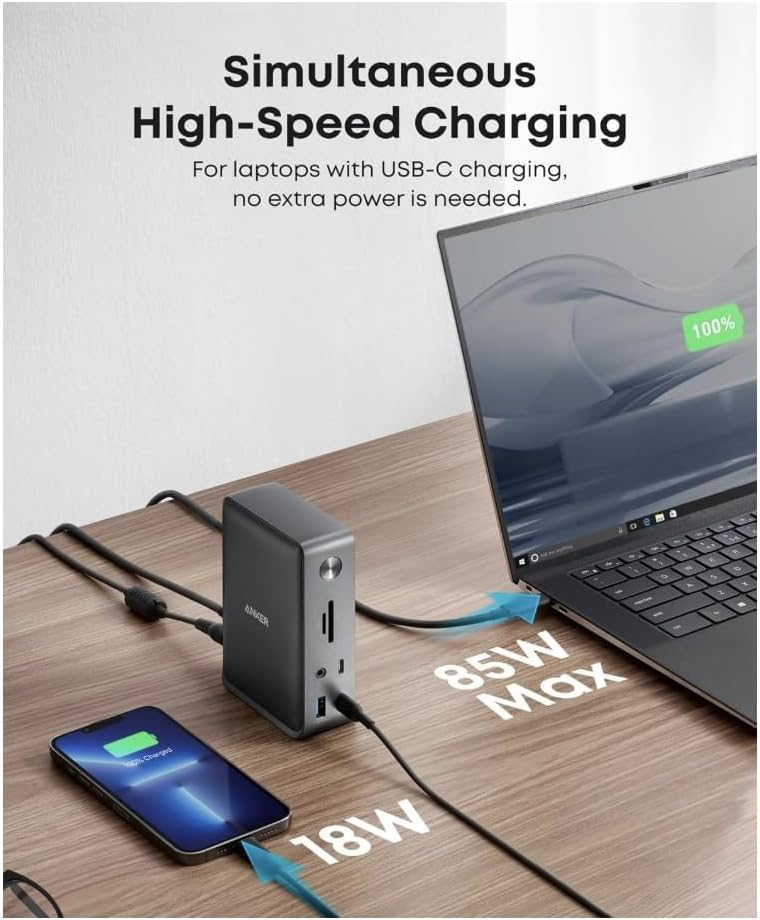
The Anker docking station is a strong mid-range option with 13 ports, including Thunderbolt, HDMI, SD card slots, Ethernet, and USB ports. It supports dual 4K displays at 60Hz and delivers 85W charging.
Why experts recommend it: Great balance of price, performance, and connectivity—ideal for designers, video editors, and creative professionals.
4. Plugable USB-C Triple Display Dock
Best for Multi-Monitor Setup
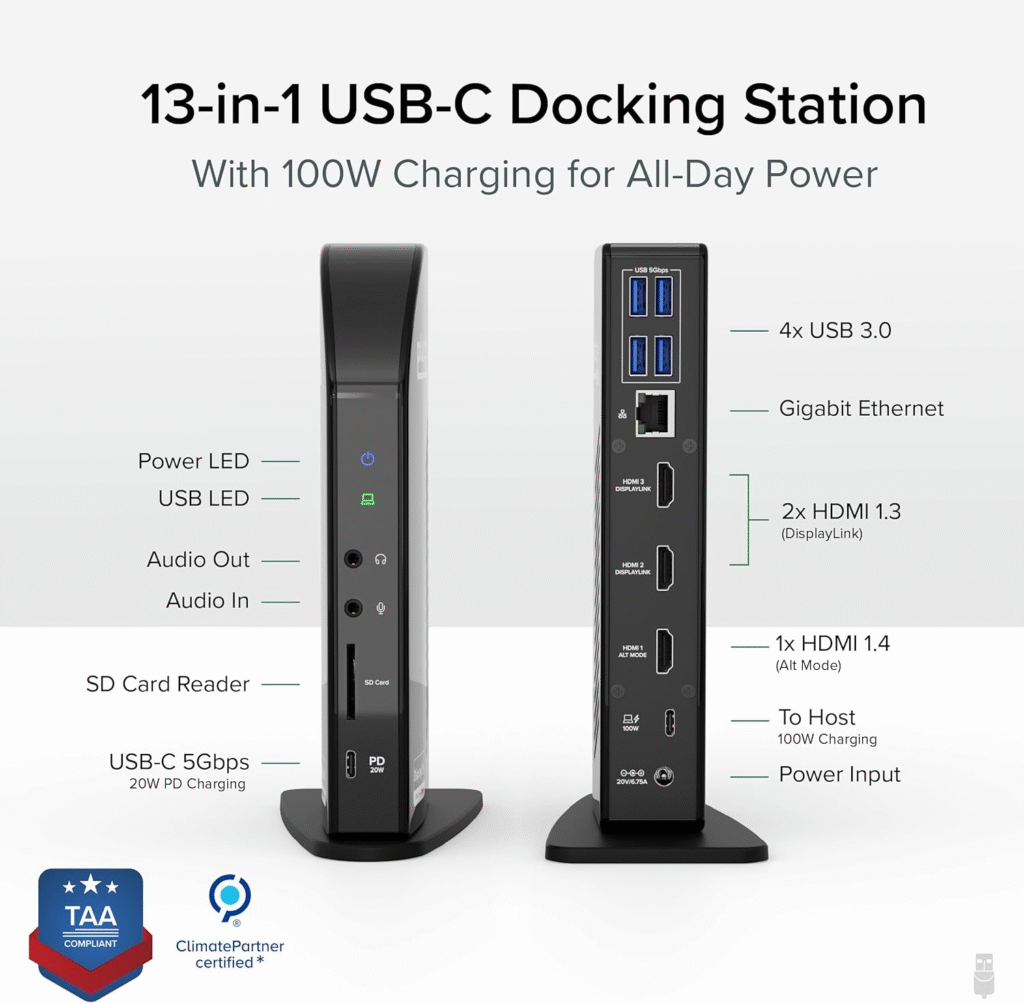
Plugable USB-C Triple Monitor docking station is designed for those who need three displays. It supports HDMI and DisplayPort connections, comes with USB 3.0 ports, Ethernet, and audio. It’s a great fit for multitaskers who need maximum screen space.
Why experts recommend it: Triple display support at an affordable price point is a rare find.
5. Lenovo ThinkPad Universal Dock
Best for Business Use
Lenovo’s universal docking station works with most laptops, not just ThinkPads. It offers dual 4K monitor support, plenty of USB ports, Ethernet, and reliable power delivery.
Why experts recommend it: Solid performance, trusted brand, and great for office setups.
Tips for Choosing the Right Docking Station
With so many options, how do you know which one is best for you? Here are some quick tips:
- If you use multiple monitors, choose a dock that supports at least two or three displays.
- For MacBook users, a Thunderbolt dock like the CalDigit TS4 or Anker 577 works best.
- If you’re looking for a budget option, go for Plugable docks—they offer great features at a reasonable cost.
- For business professionals, Dell and Lenovo docks are reliable and widely used in offices.
Are Docking Stations Worth It?
The short answer is yes—if you use your laptop as your main work device. They save time, reduce cable clutter, and turn your laptop into a fully functional desktop setup. For students, remote workers, and professionals, a docking station is a smart investment.
However, if you only use your laptop occasionally or don’t need external monitors, a docking station may be unnecessary. In that case, a simple USB-C hub might be enough.
Final Thoughts
The best docking station for laptops depends on your specific needs. Whether you’re a student who wants a simple setup, a professional needing multiple monitors, or a creative who demands high-speed ports, there’s a docking station designed for you.
- Best overall for professionals: Dell WD19S
- Best premium option: CalDigit TS4
- Best budget/multi-monitor setup: Plugable Triple Display Dock
- Best for Mac users: Anker 577
- Best for businesses: Lenovo Universal Dock
Investing in the right docking station can save you time, boost productivity, and create a clutter-free workspace. In 2025, with laptops becoming slimmer and ports fewer, docking stations are not just accessories—they’re essential tools for modern work.
Best CATAN Board Game Review | Is It Worth Playing in 2025?
Best Lightweight Camping Chair for Hiking and Travel | Experts Review